If your business is renting an office, shop lot, equipment or other business assets, you may have noticed that certain rental and leasing services can be subject to 8% Service Tax (SST).
For eligible micro and small enterprises, this additional SST cost may be reduced through the MyPMK system.
Starting from 1 July 2025, eligible SMEs that wish to enjoy SST exemption for certain rental services must register through the MyPMK system. No MyPMK registration may mean no SST exemption.
This guide explains what MyPMK is, who may need to register, and how to complete the MyPMK registration step by step.
What Is MyPMK?
MyPMK stands for Sistem Perusahaan Mikro dan Kecil, which means Micro and Small Enterprises System.
It is an online system by the Royal Malaysian Customs Department (RMCD / JKDM) that helps identify a company’s or individual’s annual sales based on the latest tax assessment information.
The official MyPMK user guide states that the system is used to identify annual sales amounts based on the latest tax assessment for a company or individual.
In simple terms, MyPMK helps Customs verify whether a business falls within the micro or small enterprise category for relevant SST exemption purposes.
Why MyPMK Registration Matters for SMEs
For business owners, rental and leasing costs are often recurring monthly expenses.
These may include:
• Office rental
• Shop lot rental
• Equipment leasing
• Business asset rental
• Other taxable rental or leasing services
If SST applies, your business may need to pay an additional 8% Service Tax on top of the rental or leasing amount.
By registering under MyPMK, eligible SMEs may support their exemption status and avoid paying SST on qualifying rental or leasing services.
Who Should Register for MyPMK?
Businesses should consider MyPMK registration if they are:
• A micro or small enterprise
• Renting premises or business assets
• Using rental or leasing services subject to SST
• Seeking SST exemption for qualifying rental services
• Required by the landlord or services provider to provide MyPMK confirmation
Based on the reference guide, exemption eligibility applies to officially registered SMEs with annual sales turnover not exceeding RM1 million.
Business owners should ensure their declared information is accurate and consistent with tax records.
What You Need Before Registering
Before starting your MyPMK registration, prepare the following:
• Company or business registration details
• Identification number of the authorised person
• Company name or business name
• Email address for verification
• Contact details
• Latest annual sales information
• Supporting tax or business records, where applicable
Make sure the email address is active because the system will send a verification email and login credentials.
How to Register for MyPMK: Step-by-Step Guide
Step 1: Visit the Official MyPMK Website
Go to the official MyPMK portal:
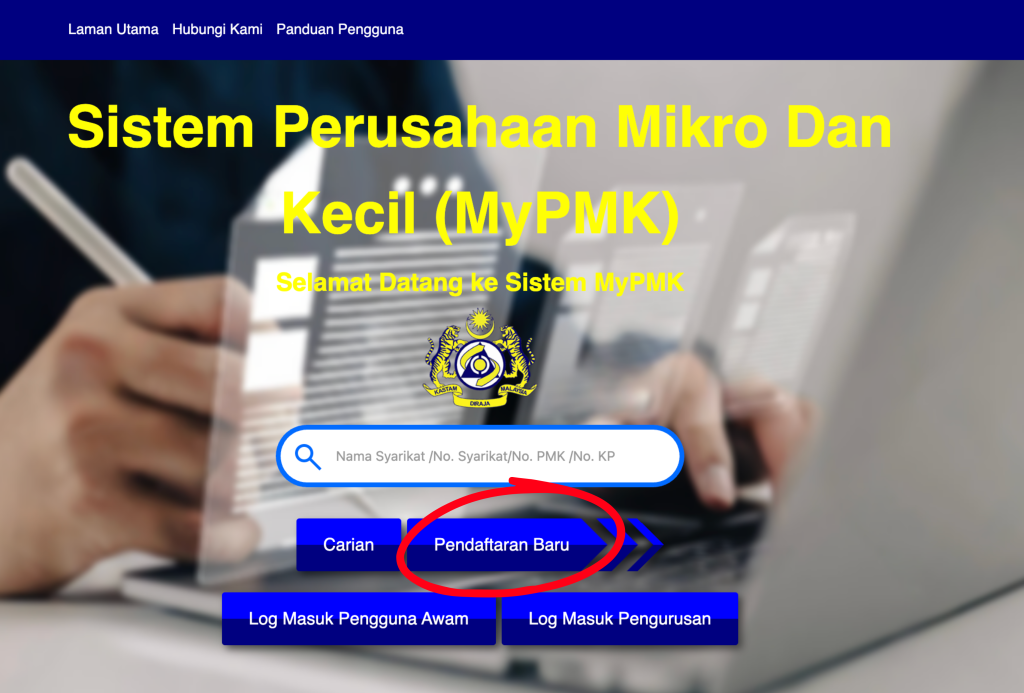
On the homepage, click “Pendaftaran Baru” to start a new registration.
The official MyPMK user guide states that users should access the MyPMK website and use the registration function from the homepage.
Step 2: Create an Account and Fill In Your Details
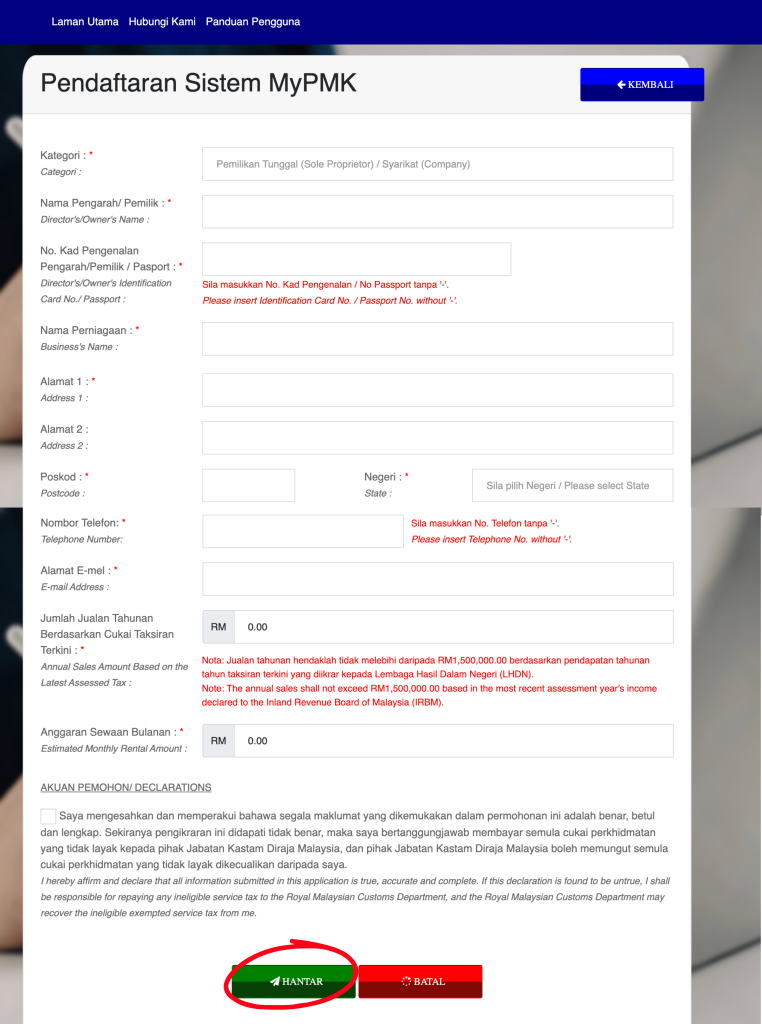
Complete the MyPMK registration form by filling in all required information.
This may include your company or business details, identification information and contact details.
After completing the form, click “Hantar” to submit.
Step 3: Verify Your Identification Number
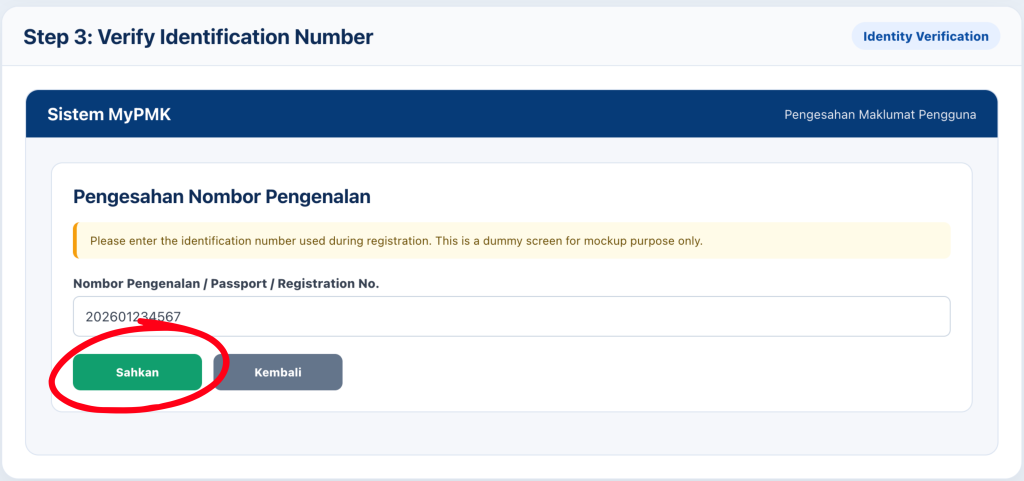
After submitting the registration form, the system will ask you to enter your identification number for verification.
Enter the same identification number used during registration and click “Sahkan”.
Make sure the number matches your registration details to avoid verification issues.
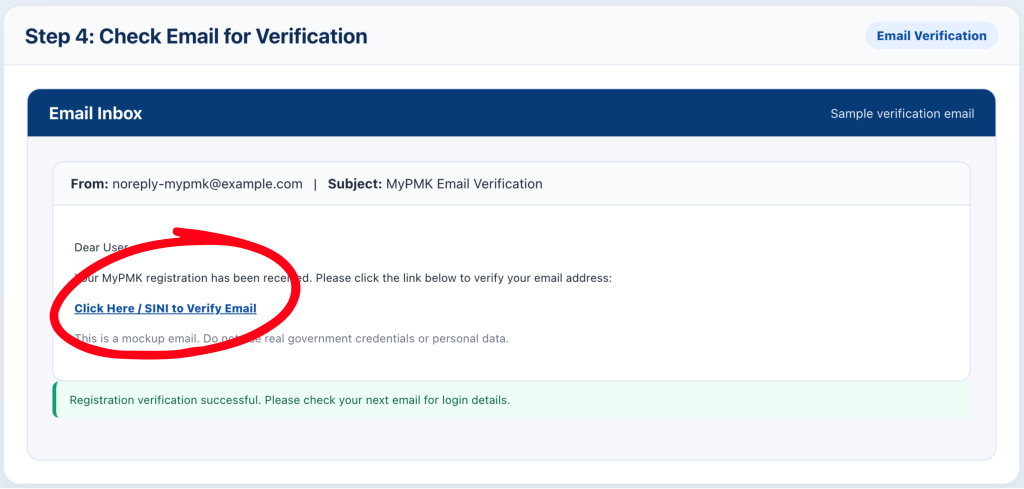
Step 4: Check Your Email for Verification
After identity verification, you should receive an email from the MyPMK system. Open the email and click the verification link, usually marked as “SINI”, to confirm your registration.
Once verified, the system will display a successful registration message.
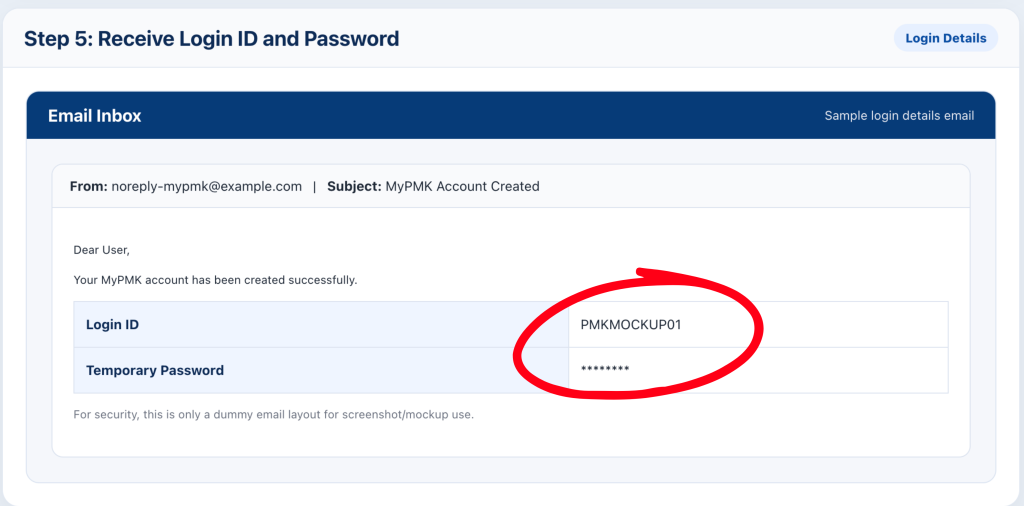
Step 5: Receive Your Login ID and Password
After the email verification is successful, you will receive another email containing your MyPMK login ID and password.
Keep this information safely because you will need it to log in and manage your MyPMK information.
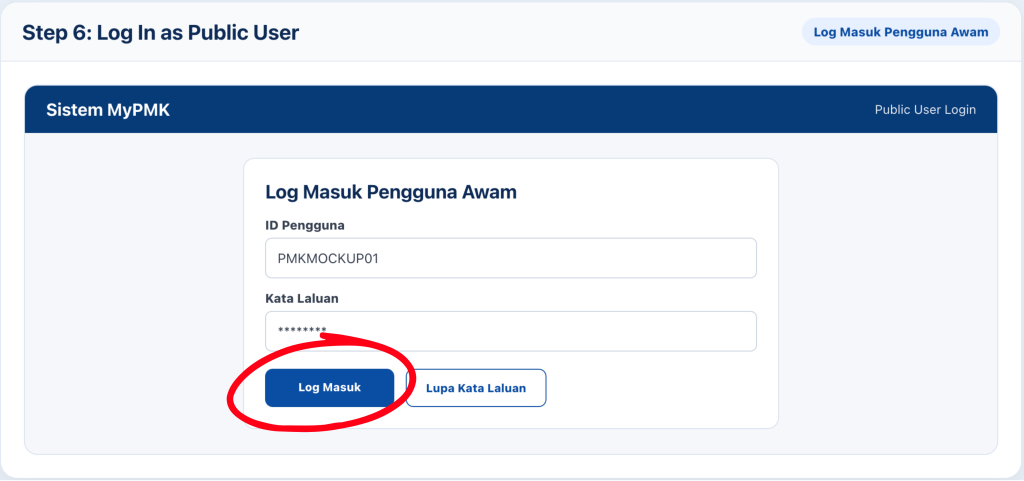
Step 6: Log In as Public User
Return to the MyPMK website and click “Log Masuk Pengguna Awam”.
Enter the login ID and password provided in the email, then click “Log Masuk”.
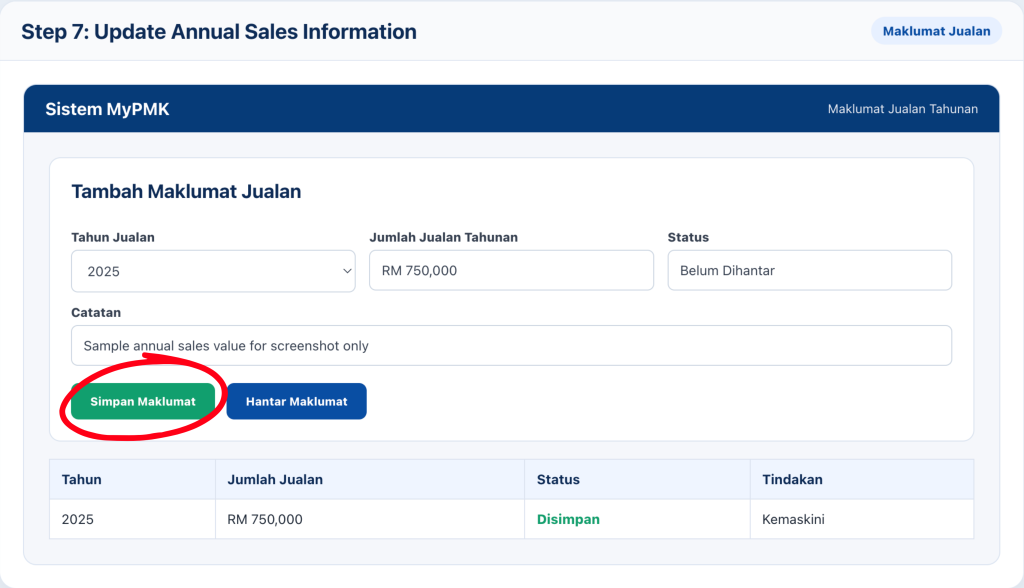
Step 7: Update Your Annual Sales Information
After logging in, go to “Maklumat Jualan”.
This section allows you to add or update annual sales information.
Select the relevant year, click “Tambah Maklumat Jualan”, fill in the required sales information and click “Simpan Maklumat”.
According to the official MyPMK user guide, only sales years up to three years before the current year are available for selection, and years that have already been submitted may be removed from the selection list.
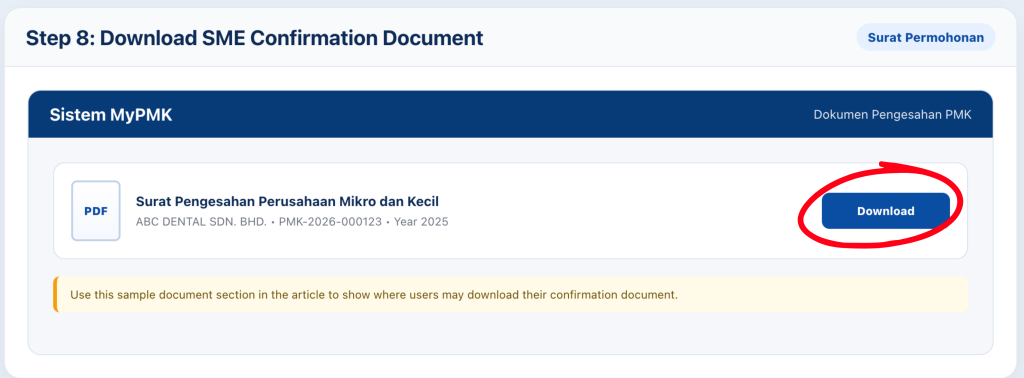
Step 8: Download the SME Confirmation Document
Once your registration and sales information are completed, you may download the relevant SME confirmation document through the system.
This document may be provided to your landlord or service provider to support your SST exemption request.
Step 9: Check Your MyPMK Registration Status
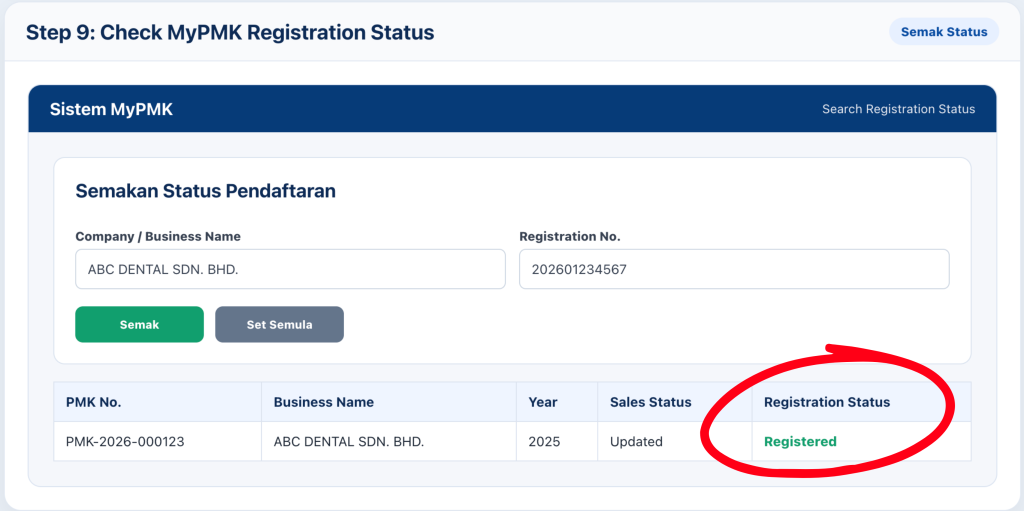
You may check whether your registration is successful through the search function on the MyPMK homepage.
The MyPMK portal allows users to search using information such as:
• PMK registration number
• Identification number
• Company registration number
• Company name or business name
• Year of updated sales value
If your registration is successful, your company or business name should appear in the search result.
Common Mistakes to Avoid During MyPMK Registration
1. Using the wrong identification number
The identification number used for verification must match the number submitted during registration.
2. Not checking your email
The registration process requires email verification. If you skip this step, your account may not be activated properly.
3. Entering inaccurate annual sales information
Your annual sales information should be accurate and consistent with your tax records.
4. Forgetting to update sales information
MyPMK is used to identify annual sales information. Make sure your information is updated when required.
5. Assuming registration means automatic exemption for everything
MyPMK supports eligibility verification, but the SST treatment still depends on the type of service and applicable Customs requirements.
What Happens After MyPMK Registration?
After successful registration, you should:
• Download your SME confirmation document
• Provide it to your landlord or service provider if required
• Keep a copy for your business records
• Update your sales information when necessary
• Ensure your rental or leasing arrangement qualifies for the relevant SST exemption
If the information submitted is inaccurate, Customs may take further action or recover the applicable Service Tax.
Frequently Asked Questions About MyPMK
↳ Is MyPMK registration compulsory for SST rental exemption?
Based on the reference guide, SMEs that want to enjoy SST exemption for rental services must complete registration through MyPMK.
↳ What is the annual sales threshold?
The reference guide states that exemption eligibility applies to registered SMEs with annual sales turnover not exceeding RM1 million.
↳ Can I register MyPMK online?
Yes. MyPMK registration is completed online through the official MyPMK portal.
↳What if I forget my MyPMK password?
You can use the “Lupa Kata Laluan” function on the MyPMK portal. The official user guide states that users may submit the forgot-password form and check their email for a new password.
↳ Do I need to update annual sales every year?
You should update your sales information when required to ensure your MyPMK records remain accurate.
MyPMK registration is an important step for eligible SMEs that wish to apply for SST exemption on qualifying rental or leasing services. For business owners, the key is to register correctly, verify your email, update your annual sales information and keep the SME confirmation document for reference.
Taking these steps early can help avoid delays when dealing with landlords, service providers or Customs-related SST matters. Need help understanding business compliance and company setup matters? Boss Boleh is here to assist.
Want to know more about starting a Sdn Bhd? What’s the best way to start one, and what should you be mindful of? Register and find out in our upcoming webinar!
Sources:
The official MyPMK user guide explains that the system identifies annual sales based on the latest tax assessment and provides steps for registration, login, sales information updates and profile management.
The reference guide states that SMEs seeking SST exemption for rental services from 1 July 2025 must complete MyPMK registration and that eligibility applies to SMEs with annual sales turnover not exceeding RM1 million.
Are you ready to form your Sdn Bhd with Malaysia’s #1 award-winning Online Company Secretary? Contact us now via WhatsApp @018-7678055!